
A lot of the work businesses still do by hand comes down to the same thing. Information shows up inside a document, and someone retypes it into something useful.
Invoices into a ledger. Forms into a spreadsheet. Receipts into your accounting software. It is repetitive and predictable, which is exactly why it is a good fit for AI.
The part people get wrong is assuming the model is the hard part. It usually isn't.
Modern models are very good at reading a document and pulling out what you ask for. The hard part is everything around that. Gathering good examples, testing properly, and being willing to cut a bloated prompt back down until it actually works.
Here is the process I follow when I automate a document workflow. It is five steps, and the order matters.
What this guide covers
- Step 1: gather your example documents and split them into a build set and a test set
- Step 2: let an AI write the first version of your prompt, with the output as JSON
- Step 3: read it carefully and cut it down
- Step 4: run your test documents through it and check the results
- Step 5: refine until it holds, then decide where it runs
Read it start to finish, or jump to wherever you are stuck.
Step 1: Gather your examples and split them into a build set and a test set
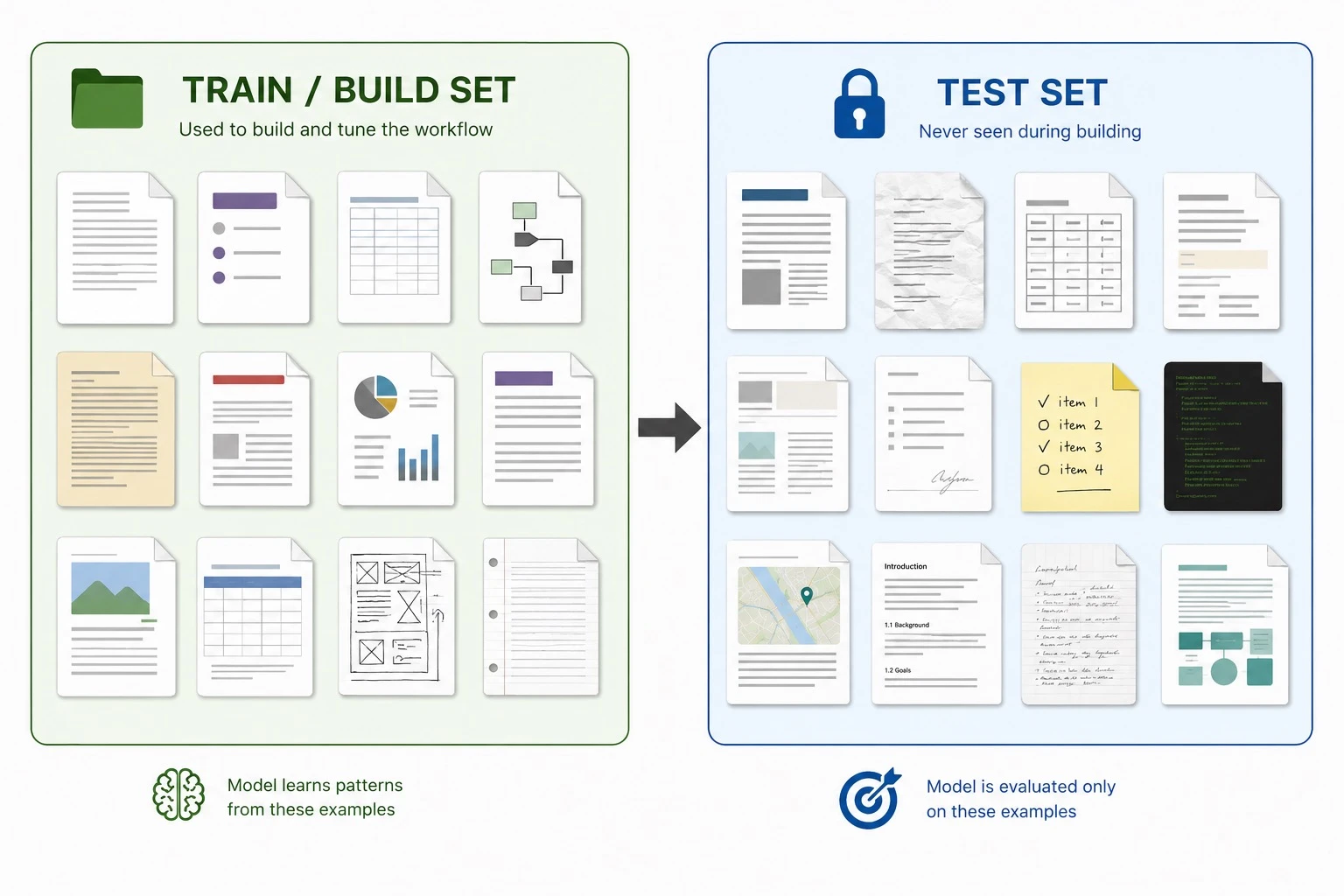
Before you write anything, collect documents. As many genuinely different examples as you can get, and for each one, the exact output you would want from it.
Different is the word that matters. Whatever kind of document you are working with, you do not want twenty copies of the same template.
If it is invoices, you want lots of vendors in lots of layouts. If it is contracts, you want different lengths and clauses and formats. If it is intake forms, resumes, purchase orders, or shipping documents, you want the messy ones alongside the clean ones.
Some with every field filled in and some half blank. Clean digital PDFs and ugly scanned photos. The variety is the point, because it forces your workflow to deal with the real world instead of one tidy corner of it.
Organize them into folders, and then do the thing most people skip. Split your examples into a set you build with and a set you only test against.
This comes straight from how machine learning models are evaluated, and it matters for the same reason. If you tune your prompt against the same documents you use to judge it, you have no idea whether it actually learned the task or just memorized those specific files.
Holding back a separate set of documents the prompt never saw while you were building is the only honest way to answer the question you actually care about, which is whether this will work on the next document you have not seen yet.
It also shows you bias. If your workflow nails every document that looks like the handful you built on but falls apart on a layout it was not tuned on, that is a workflow that learned your sample, not the task. The held back set is what catches that before your customers do.
A simple rule is to keep most of your examples for building and set aside a meaningful chunk, maybe a quarter or a third, that you do not touch until you are testing. The more varied both sets are, the more you can trust the result.
Step 2: Let an AI write the first version of your prompt
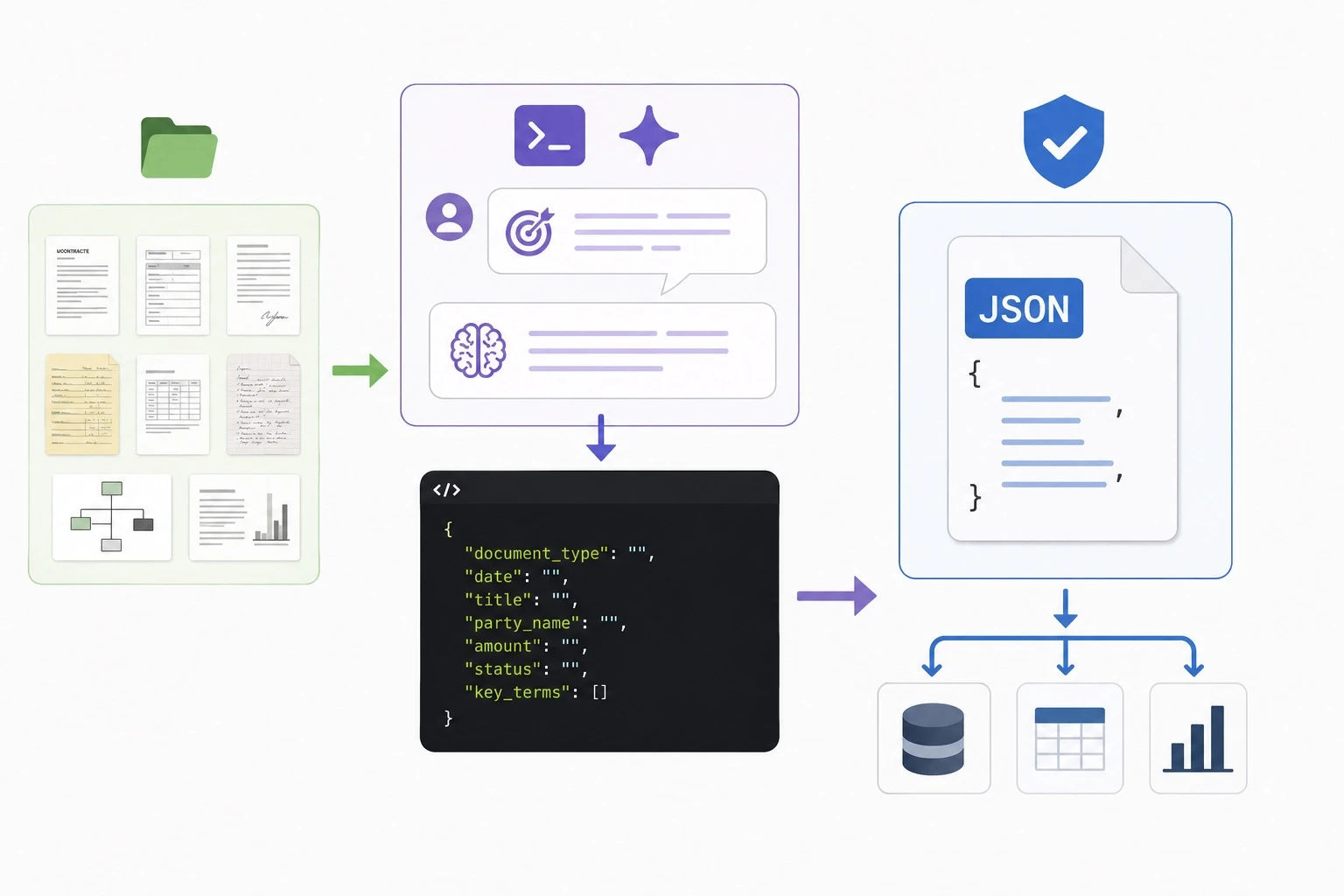
You do not need to write the prompt yourself from a blank page. The fastest way to start is to describe what you want, in plain language, to an AI like Claude or ChatGPT, and let it draft the prompt for you.
Be specific about the goal. Tell it exactly what you are trying to pull out of each document. The names, the dates, the reference numbers, the line items, the totals, whatever your workflow actually needs, whether that is an invoice, a contract, a form, or anything else.
Give it one of your example documents to work from, and it will hand you a first version in seconds.
There are two things to be firm about here.
Ask for the output as JSON
You do not want a paragraph of prose back. You want structured data your code can use.
If you have not worked with it before, JSON is just a simple, standard way to write down data as a set of labeled fields. Each thing you want to capture gets a label, called a key, paired with the value the model pulled from the document.
For a single document, the output might look like this:
{
  "document_type": "service agreement",
  "title": "Website Redesign Project",
  "date": "2026-06-14",
  "parties": ["Acme Corp", "Bright Studio"],
  "reference_number": "SA-2026-0145"
}
That is all JSON is. A predictable list of key: value pairs. Because the shape is always the same, your code can reliably grab reference_number or date every single time, instead of trying to fish it out of a sentence.
Do not just ask for JSON, enforce it in your own code
Asking nicely in the prompt is not the same as guaranteeing it. Models sometimes wander, wrap the JSON in commentary, or drop a field.
So check the output against the shape you expect, and reject or retry anything that does not match. Most providers also have a structured output or JSON mode that forces the format for you, so use it.
The goal is that by the time the data reaches the rest of your workflow, it is always the same shape, every time. That guarantee is what keeps everything after it simple.
Keep the prompt in its own markdown file
One small habit that pays off early: do not bury the prompt inside your code as a giant string. Put it in its own markdown file, something like extraction_prompt.md, and have your code read it in.
Markdown (a .md file) is just plain text with light formatting, which makes a prompt easy to read and easy to edit. A first version might look like this:
You are extracting structured data from a document.

Read the document and return ONLY a JSON object with these fields:

- document_type: what kind of document this is, in a few words
- title: the title or subject of the document
- date: the main date on the document, formatted as YYYY-MM-DD
- parties: a list of the people or organizations named in the document
- reference_number: any ID or reference number on the document

If a field is not present in the document, return null for it. Do not guess.
Return nothing except the JSON object.
Keeping it in a file means you can read it, edit it, and track its changes over time without touching the rest of your code. That matters a lot in the next step, where most of the work is editing this file.
Treat this first prompt as a starting point, not a finished thing, which leads straight into the most important step.
Step 3: Read it carefully and cut it down
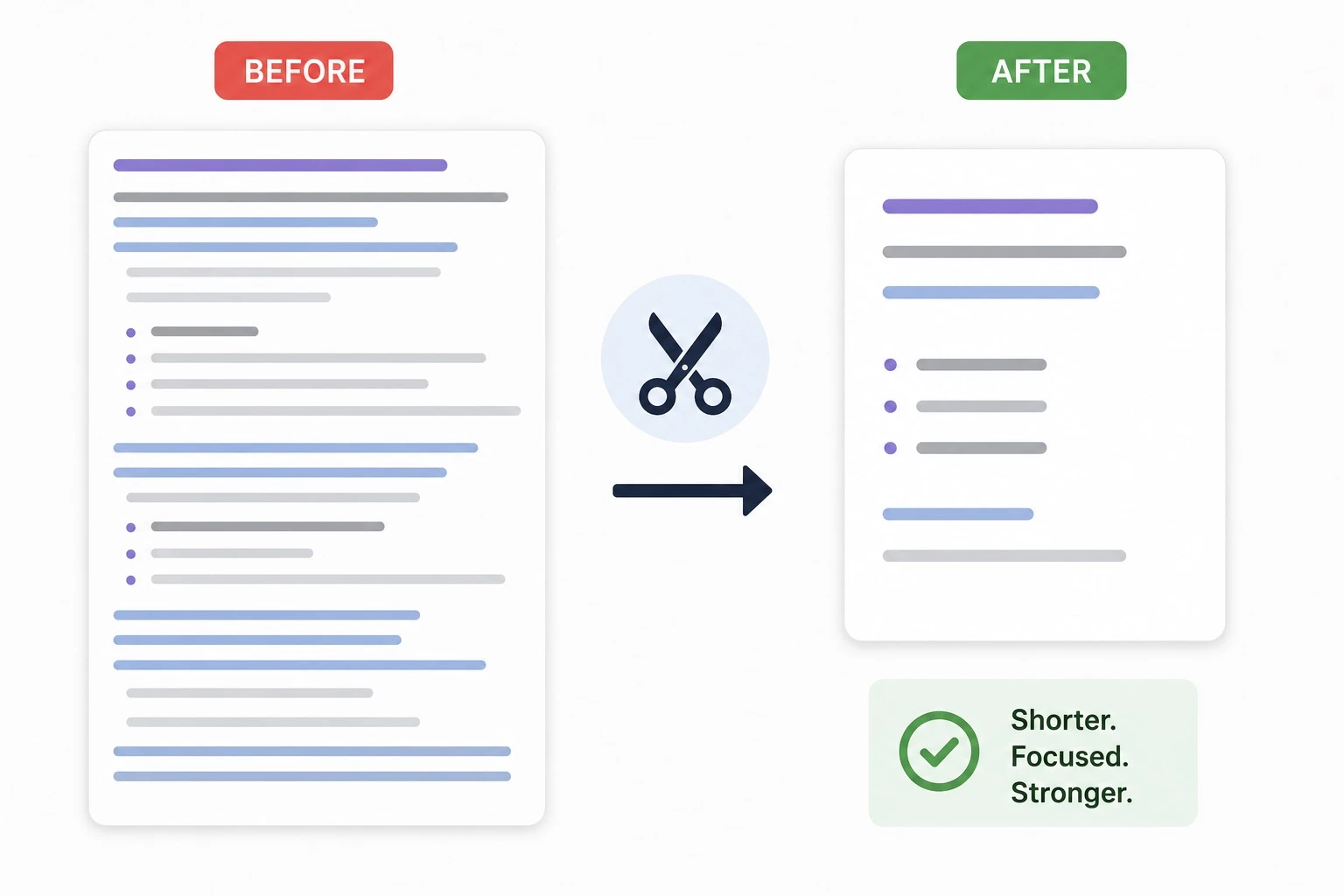
This is the step everyone underestimates, and it is the one that decides whether your workflow actually works or just almost works.
AI overengineers prompts. Ask a model to write you one and it gives you something long, detailed, and very thorough looking. Full of caveats and edge cases and instructions you never asked for.
It reads like an expert wrote it. And a lot of the time it is quietly wrong. It tells the model to do things you do not want, pulls out fields you did not ask for, or stacks up rules that contradict each other on real documents.
So read every line of what it gave you, and assume some of it is wrong until you have checked. Then cut.
Make the prompt shorter. A short, sharp prompt is easier for the model to follow and easier for you to reason about. Long prompts hide contradictions, short ones do not have room to.
Take fields out of the output. Every field you ask for is one more thing that can come back wrong. If you do not actually use it later, drop it. Fewer fields means fewer ways to fail and better accuracy on the ones that matter.
Cut any instruction you cannot explain. If you do not know why a line is in the prompt, it probably should not be.
The instinct most people have when the model gets something wrong is to add more instructions. Usually the fix is the opposite.
You take things away until what is left is precise. Shorter almost always wins, and this one habit does more for accuracy than anything else in the whole process.
Step 4: Run your test documents through it and check the results
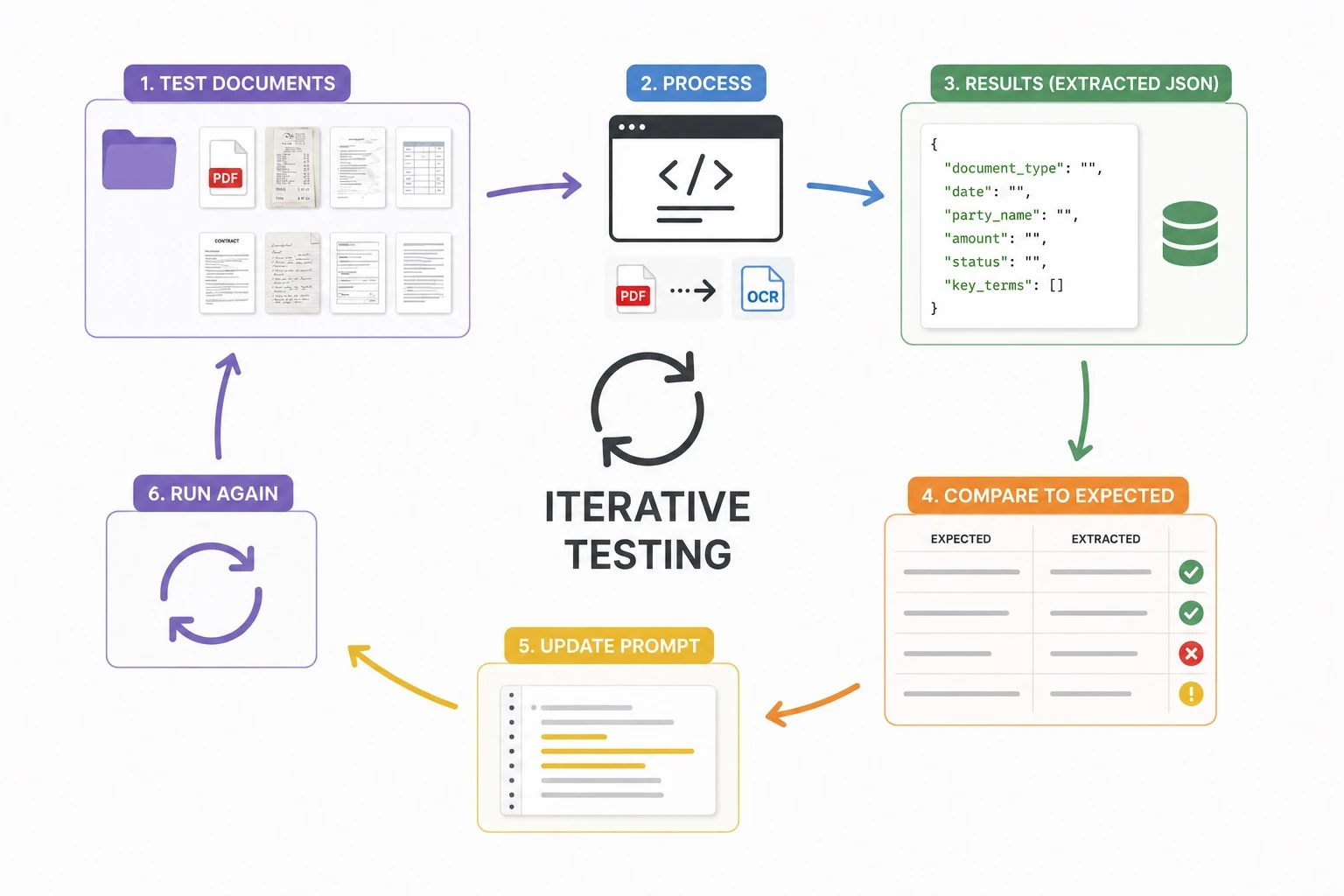
Now actually run it. Push your documents through and compare what comes out against the outputs you wrote down back in step one.
First you have to get the document into a form the model can read. For PDFs there are two ways to do it.
You can turn the PDF into an image and send that to a model that can see. This is the more reliable option for messy, scanned, or visually complicated documents, since the model sees the page the way a person would.
Or you can pull the text out with a PDF library and send the text. This is cheaper and faster and works well for clean, digital PDFs.
One thing to watch here is licensing. Not every PDF library is free to use in a commercial product.
The most popular one, PyMuPDF, is AGPL licensed, which can mean you need to pay for a commercial license depending on how you ship your software. Others like pypdf, pdfplumber, and pdfminer.six are permissively licensed and are generally fine for commercial use.
Whatever you reach for, check the license before you build on it. It is a bad surprise to find out late that something at the core of your workflow was never cleared for the way you are using it.
Once documents are flowing through, be honest about the results. Run your build set first to clear out the obvious problems. Then run the set you held back, the documents the prompt never saw, and see if the quality holds. That second run is the one that tells you the truth.
And run your whole test set again every time you change the prompt. This is easy to forget. When you tweak the prompt to fix one document, you can quietly break another, and the only way to know is to test them all again after each change.
Step 5: Refine until it holds, then decide where it runs
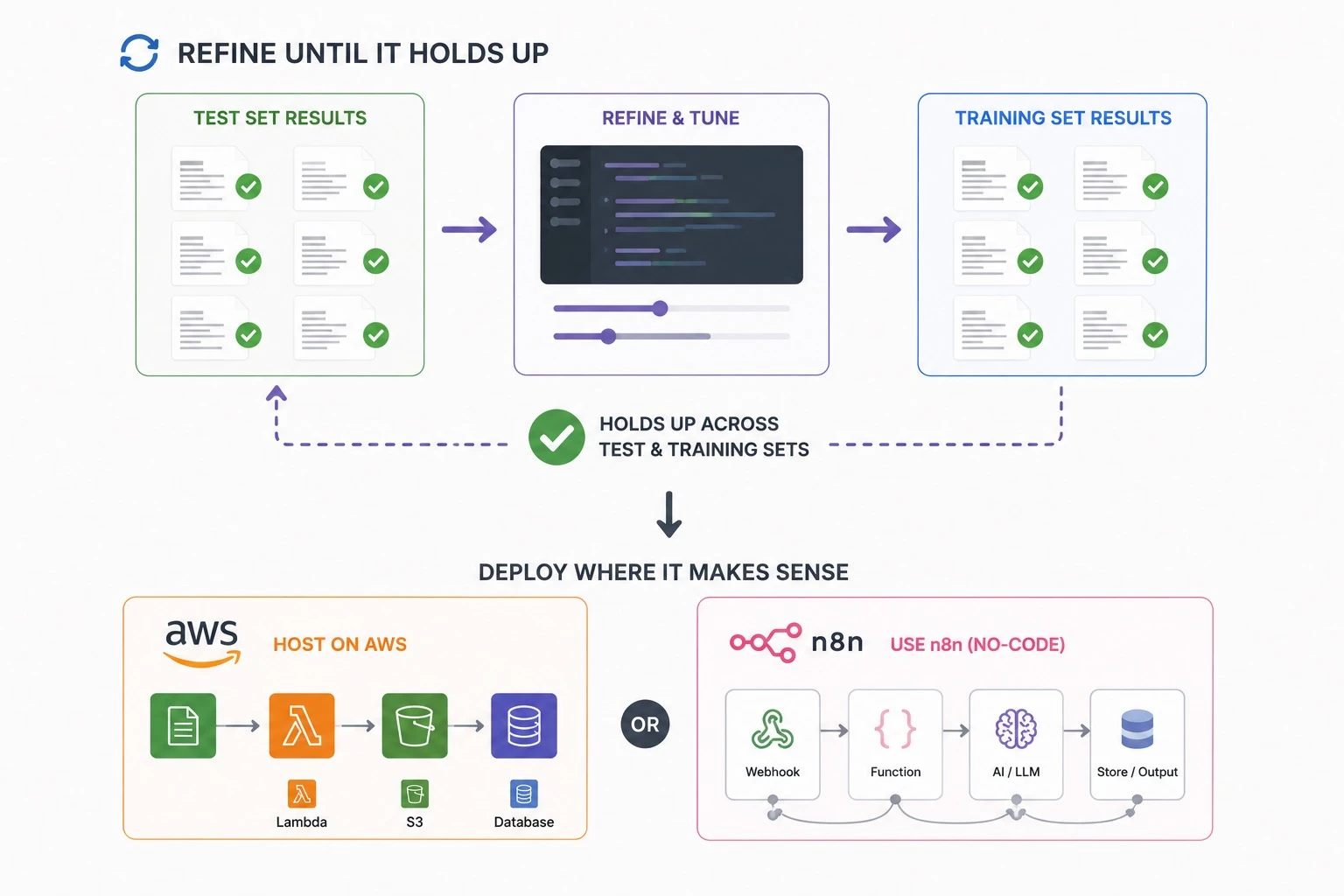
Good extraction comes from looping, not from nailing it on the first try.
Look at where the test set failed, adjust the prompt, usually by cutting and sharpening like in step three, then run the tests again. Each loop should close the gap between what comes out and what you wanted. Keep going until it holds up across your whole test set, including the documents you held back.
When the workflow itself is solid, decide where it should live.
If you want to move fast, or you want something your team can actually see and maintain, a no code tool like n8n is a great place to run it. You build it as visual blocks, drop your prompt into an AI step, and connect it to wherever the documents come from and go.
If you need more control, more volume, or lower cost at scale, code running on something like AWS is the better home, and running it serverless means you only pay when a document actually comes through.
A nice middle path is to have an AI coding tool like Claude Code draft the whole workflow, then run it inside n8n so you get the speed of letting AI build it and a result your team can still read.
Once you have the data, decide how the output gets written
Everything up to this point is about extraction. Getting clean, structured data out of the document. What you do with that data next depends on how complicated the output is, and this is where two very different paths open up.
If the output is templated, you are basically done. You take the fields you extracted and drop them into a fixed template in code. A summary line, a row in a spreadsheet, a filled in form, a standard report with the same shape every time.
No more AI needed past the extraction. This is the case you want, and it covers more workflows than people expect.
If the output needs interpretation, it is a harder problem. When the result is not "put this number here" but "read this and write the right thing about it," you are no longer templating, you are asking for judgment.
That usually means a second AI step whose job is the writing, not the extraction. And that step needs examples.
You want a library of good past outputs, the kind you would be happy to ship, so the model has something to match. The usual way to feed it those is RAG, short for retrieval augmented generation, where for each new document you pull the most similar past examples and hand them to the model alongside the new one.
The closer those examples are, the better the interpretation, because the model is matching how real cases like this one were actually handled.
You do not have to make one AI do all of this. A cleaner approach is to split the judgment into separate cases and give each one its own writer.
You route each document to the right writer, either with a small AI classifier or by reusing what you already know about it from the extraction step. Sometimes you split by document type. But often it is within a single type, where the same document can come from a different originator or arrive as a different subtype, and each one calls for a different workflow. You route by that subtype, and each writer gets its own prompt and only sees the past examples for the subtype it owns, so it is never distracted by the others.
               Extracted data  (one document type)
                                 │
                                 ▼
                       ┌───────────────────┐
                       │   AI classifier   │  ← routes by subtype or
                       │ route by subtype  │     originator of the document
                       └─────────┬─────────┘
           ┌─────────────────────┼─────────────────────┐
           ▼                     ▼                     ▼
   ┌───────────────┐     ┌───────────────┐     ┌───────────────┐
   │   WRITER A    │     │   WRITER B    │     │   WRITER C    │
   │    type A     │     │    type B     │     │    type C     │
   ├───────────────┤     ├───────────────┤     ├───────────────┤
   │ own prompt    │     │ own prompt    │     │ own prompt    │
   │ own examples  │     │ own examples  │     │ own examples  │
   │ (RAG library) │     │ (RAG library) │     │ (RAG library) │
   └───────┬───────┘     └───────┬───────┘     └───────┬───────┘
           ▼                     ▼                     ▼
      Write-up A            Write-up B            Write-up C
All three writers handle the same document type. What changes is the subtype or originator, and each writer is tuned, with its own prompt and its own example library, for the one it owns.
This pays off when the subtypes behave very differently and you want to tune the writing prompt for each one without those changes bleeding into the others. One writer per subtype means you can make a tiny adjustment for a single workflow without touching, or risking, the rest.
If the writing style is the same across all your documents and your example set is not huge, say under a thousand, you can often get away with a single writer that handles everything. That is simpler to start with, and there is nothing wrong with it.
That said, I think it is almost always cleaner to give each one its own role, whether you are splitting by document type or by subtype within one. It costs you a little structure up front, but it scales. You can add a new subtype, or fine tune one workflow, without piling more and more special cases into one prompt until nobody can reason about it.
One more thing worth doing inside the writer itself. Rather than asking the model to "write the whole report," break the report into its sections and give each section its own instructions. The same way you forced JSON on the extraction, you can structure the writing as JSON too, one key per section, so the model is filling in each part against its own directions instead of producing one big block.
It helps to write the directions as a spec the model fills in:
{
  "summary": "2-3 plain sentences, no jargon",
  "key_changes": "bullet what changed, most important first",
  "impact": "who or what this affects, and how",
  "recommended_action": "one clear next step, or 'none'"
}
The model returns the same keys with each section written to its own rules. You get tighter control over every part, the bad sections are easy to spot and fix in isolation, and you can tune one section's instructions without disturbing the rest.
Be honest about how far this goes. If the interpretation is nuanced, expect to refine it a lot. You will go around the loop many times, and some of the hardest cases may never get reliable. There is a point where the judgment is subtle enough that automating it is just not worth it.
When you hit that point, do not force it. Let the extraction do what it is good at, gathering the data, template everything you can, and write the genuinely nuanced parts yourself. A workflow that pulls the data, fills in most of the report, and leaves you the last stretch is still a huge win over doing all of it by hand.
What comes after this
Getting the extraction accurate is the part I wanted to walk through here, because everything else sits on top of it. If the core is wrong, none of the rest matters.
But I will be honest about what is left, because building the accurate part is one problem and running it in the real world is another. Once it works, you still have to:
- Handle the edge cases in plain code.
- Connect the apps your data moves between: the inbox, storage, and the tools the output feeds.
- Decide how it runs: on a webhook the moment a document arrives, on a schedule overnight, or only when you click a button.
- Choose a database to store the documents, the extracted data, and the results.
- If you are doing the interpretation step, choose a vector database to hold your examples.
- Choose an embedding model to turn those examples into something you can search by similarity.
- Choose a chunking strategy: how you split documents and examples before you embed them.
- Build the retrieval step itself: how many examples to pull for each document, and how to rank them.
- Add a queue and some concurrency control so a burst of documents does not knock the whole thing over.
- Add retries and a dead-letter path for the documents that fail partway through.
- Add logging, so you can trace what happened to any single document.
- Add monitoring and alerts, so you hear about a failure the day it happens.
- Catch the model when it makes something up, and route those cases to a human.
- Handle auth, secrets, and access, and keep an eye on the cost per document.
And this is not even the full list. Each of these is its own sub-project, and how much work it is varies a lot with the complexity of what you are building. Getting the extraction right, the part this guide is about, is really just the first step.
Putting it together
The whole thing in order:
- Gather varied examples and split them into a build set and a held back test set.
- Let an AI write the first prompt, and ask for JSON you enforce in code.
- Read it carefully and cut it down, because shorter and narrower almost always wins.
- Run your documents through, handle PDFs on purpose, mind the library license, and test again after every change.
- Refine in loops until it holds, then pick where it runs.
None of these steps is hard on its own.
The reason document automations fail is almost always that someone trusted a long prompt they never read, or skipped the testing and got surprised by the first document that did not look like their samples.
Do the five in order and you end up with something that does not just work on your examples, but keeps working on the documents you have not seen yet.
What it looks like as a folder
It helps to picture the whole thing on disk. You do not need anything fancy, just a place for your examples, your prompts, and the code that ties them together. Something like this:
document-workflow/
├── examples/
│   ├── build/            # documents you tune against
│   └── test/             # held-back set you only test on
│
├── prompts/
│   ├── extraction.md     # the extraction prompt (returns JSON)
│   └── writers/          # one writing prompt per subtype
│       ├── type_a.md
│       ├── type_b.md
│       └── type_c.md
│
├── writer_examples/      # good past outputs for RAG, by subtype
│   ├── type_a/
│   ├── type_b/
│   └── type_c/
│
├── src/
│   ├── extract.py        # PDF -> JSON, with the shape enforced
│   ├── classify.py       # route a document to its subtype
│   ├── write.py          # fill in the report sections from the data
│   └── run.py            # tie it together (webhook, schedule, or manual)
│
└── tests/                # run the test set, compare to what you wanted
The shape mirrors the steps. Your build and test sets stay split, your prompts live in their own files so they are easy to read and edit, each subtype keeps its own writing prompt and its own example library, and the code stays small. If you only need templated output, the writers/ and writer_examples/ folders simply do not exist.
How many example documents do I need?
There is no magic number, and variety matters more than volume.
A few dozen genuinely different examples, across different sources, layouts, and quality, will teach you more than hundreds of near identical ones. Whatever you gather, hold a meaningful portion back as a test set you do not tune against, so you can see whether the workflow actually generalizes instead of just memorizing.
Should I turn PDFs into images or pull the text out?
Both work, and the right choice depends on your documents.
Turning the page into an image and using a model that can see is more reliable for scanned, photographed, or visually complicated documents with tables and odd layouts. Pulling the text out with a library is cheaper and faster and is a good fit for clean, digital PDFs.
A common approach is to use text extraction by default and fall back to images when the text comes out unreliable.
If you would rather not build this yourself for invoices and receipts, that is exactly what we do. DocStreamAI captures invoices and receipts straight from your email and gets the data into QuickBooks and Xero, with the testing, edge case handling, and accuracy checks already done. Check us out here.