
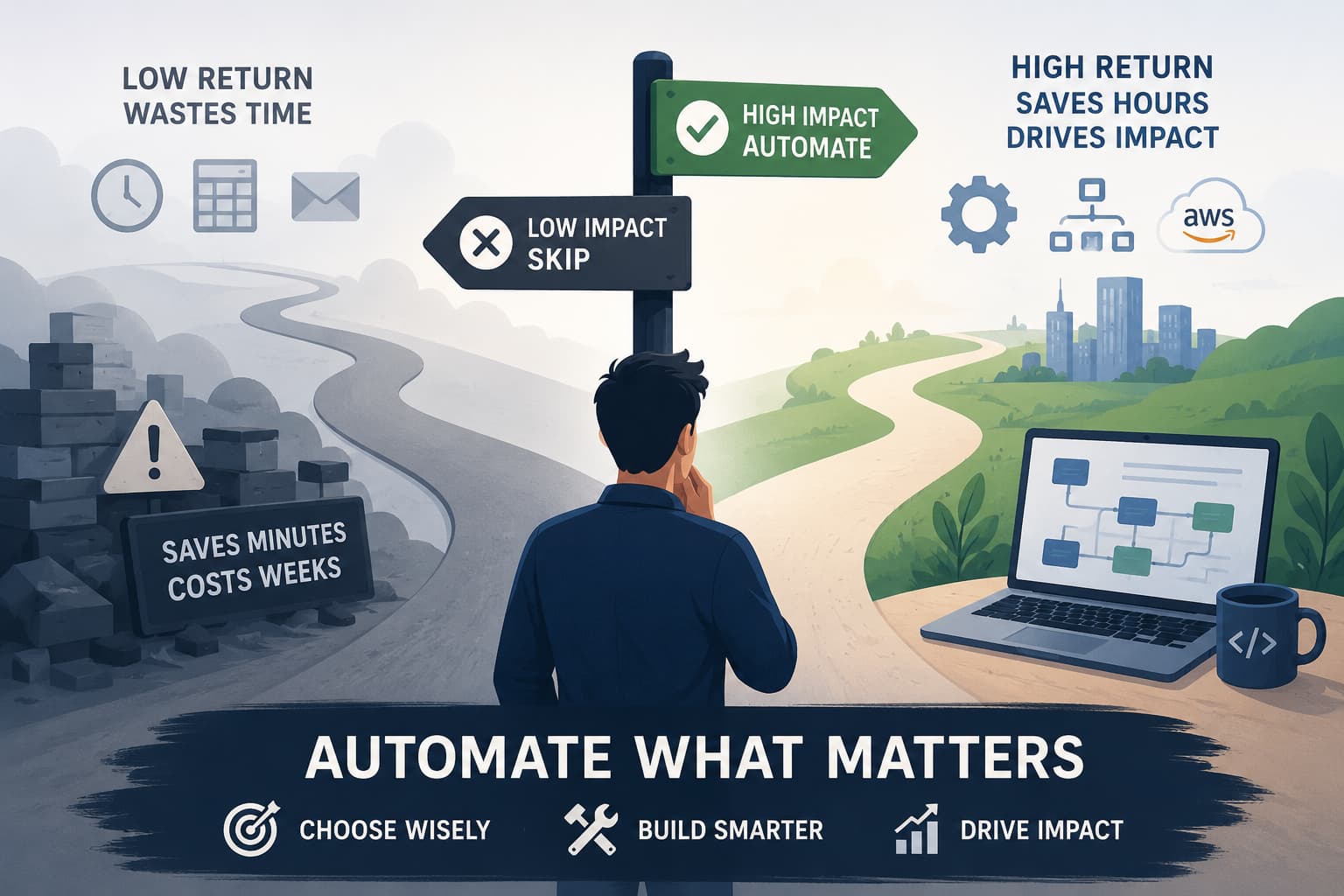
Not every task is worth automating, and chasing the wrong ones is how teams burn weeks building something that saves minutes. The hard part isn't the tooling. It's deciding what to automate, confirming it's even possible, and knowing what it'll cost before you commit. This is a five-step framework for making that call: find the right kind of task, check you can actually get the data, score it honestly, pick how to build it, and understand what it costs to run.
What you'll learn in this article
- Step 1: what makes a task a strong automation candidate (repetitive and systematic)
- Step 2: why you must confirm you can actually get the data before building, and the vendor-API traps that sink projects
- Step 3: how to score a task on a PICK value-vs-effort matrix, and why complexity is the axis people misjudge
- Step 4: when to reach for no-code (n8n, Zapier) vs. code on AWS, and why webhooks sit under both
- Step 5: how AI pricing actually works, why "thinking" and full agents blow up the bill, and how the right model choice can cost 20–200x less
Skim the steps, or read the one that matches where you're stuck.
Step 1: Find a process that's repetitive and systematic
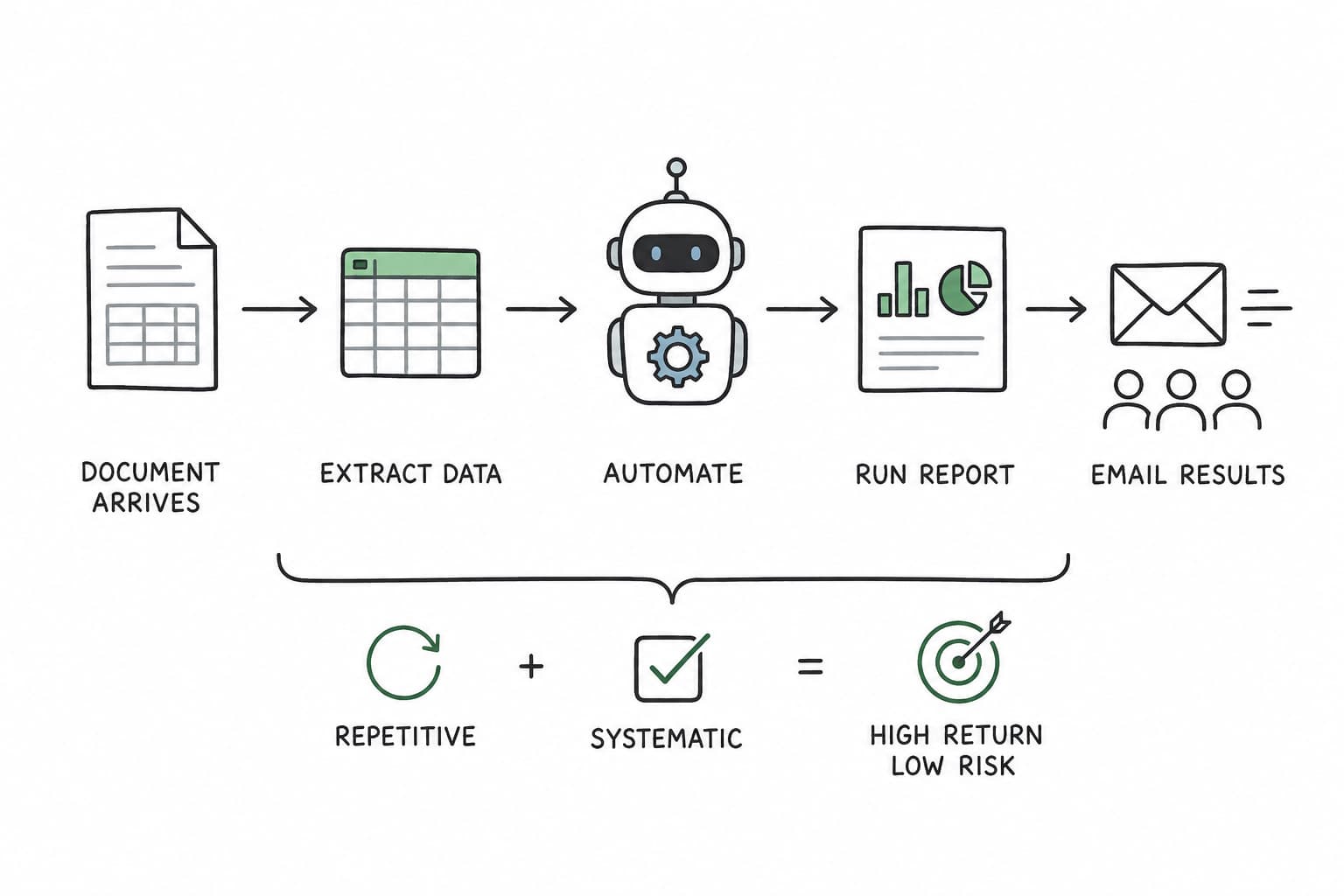
The best automation candidates share two traits: they are repetitive and they are systematic. Repetitive means the task happens often enough that small per-run savings compound into real hours. Systematic means the steps are predictable: the same inputs, the same decisions, the same outputs every time, with few genuine exceptions.
When a process is both, it's a prime target. You're essentially writing down a set of rules a human already follows on autopilot and handing them to a machine. The return is high because the work is frequent, and the risk is low because the logic is stable.
Consider a workflow almost every operations or finance team runs in some form:
- A document arrives (an order, a form, a report submission).
- Someone copies key information from that document into an Excel sheet.
- A report is run against that sheet.
- The report is emailed out to the relevant team members.
Look at the shape of it. Every step is repetitive; it happens on a schedule or every time a document lands. Every step is systematic: the same fields get copied, the same report runs, the same people get the email. There's almost no judgment involved; it's pure mechanical movement of data from one place to another. That is exactly the kind of task to put through the rest of this framework.
The opposite, a task that's rare or where every instance needs fresh human judgment, is usually a poor fit. You'll spend more time encoding the exceptions than you'll ever save.
Step 2: Before you build anything, confirm you can actually get the data
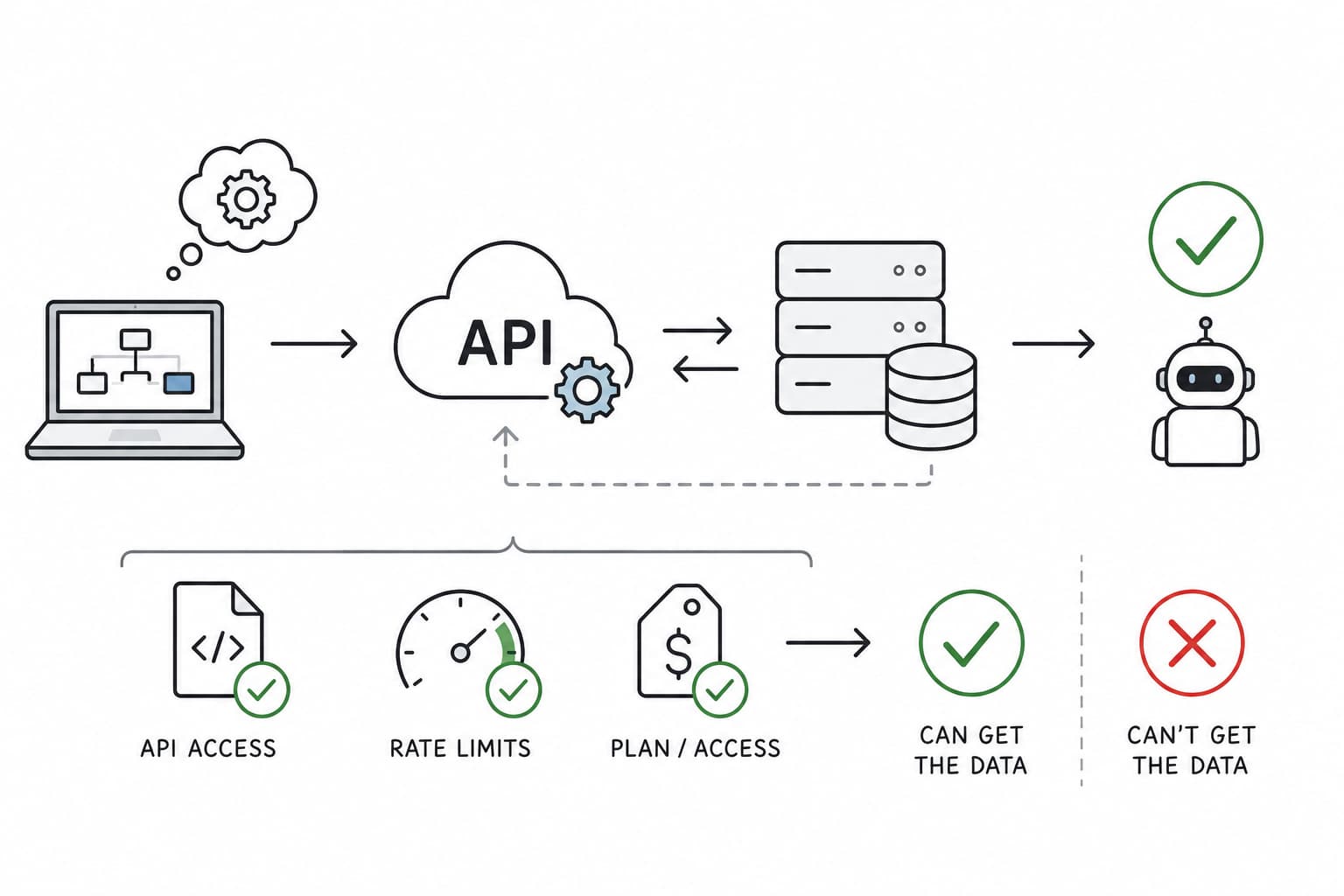
This is the step people skip, and it's the one that wrecks projects. Most automations live or die on a vendor integration: an external system (your accounting software, a CRM, a payment processor, an email provider) whose data you need to read or write through their API.
Before you design anything, find out whether that integration can actually do what your plan assumes. Discovering the answer is "no" a week into a build, after you've already wired up half the workflow, is the most expensive way to learn it.
Three things to pin down up front:
- Their API can change under you. Vendors version, deprecate, and quietly tweak their endpoints. Logic that works today can break on their release schedule, not yours. Assume you'll be maintaining the integration, not building it once.
- They have their own validation, and you have to handle their errors. Your requests must satisfy their rules: required fields, formats, rate limits, state preconditions. When you violate one, they reject the call, and your automation has to catch that error, interpret it, and recover gracefully. Error handling against someone else's validation is often the bulk of the real work.
- You might have to pay, or simply can't get the data at all. API access is frequently gated behind a paid plan or a higher tier, and some data you assume is available simply isn't exposed through the API. It's heartbreaking to design a workflow around a field the vendor never lets you read.
The cheap insurance is a 30-minute spike: read the API docs, check the pricing tier and rate limits, and pull one real record before you commit to anything. If you can fetch the data you need with the access you have, proceed. If you can't, you've just saved yourself a week, and that "no" might move the task straight to the Kill quadrant in the next step.
Step 3: Score it on a value-vs-effort matrix
Once you know the task is feasible, score it honestly. The cleanest tool for this is a PICK chart (you may know it as a PICK or "PIC" matrix from Lean), a 2×2 that plots value against effort:
| Low effort (quick, simple) | High effort (slow, complex) | |
|---|---|---|
| High value | Implement: your best automations; build these first | Challenge: real payoff, but scope it carefully before committing |
| Low value | Possible: fine to batch when you have spare time | Kill: don't bother automating this |
Plot a candidate by asking two questions: how much time/pain does this remove (value), and how hard is it to build and maintain (effort)? The top-left quadrant (high value, low effort) is where you should always start. The bottom-right (low value, high effort) is where good intentions go to die.
A note on complexity. "Effort" is the axis people misjudge, because they think in hours of typing rather than in complexity. Complexity is what really inflates effort:
- the number of systems involved,
- the conditional branching and edge cases, and
- most of all, the vendor integrations from Step 2.
A task that looks like a two-hour script can become a two-week build the moment it depends on a flaky third-party API with strict validation and errors you must handle.
So when you place a task on the matrix, let what you learned in Step 2 push it rightward: the messier the integration, the higher the effort, and the more a "high value" task slides from Implement toward Challenge.
Step 4: Pick how to build it (no-code or code)
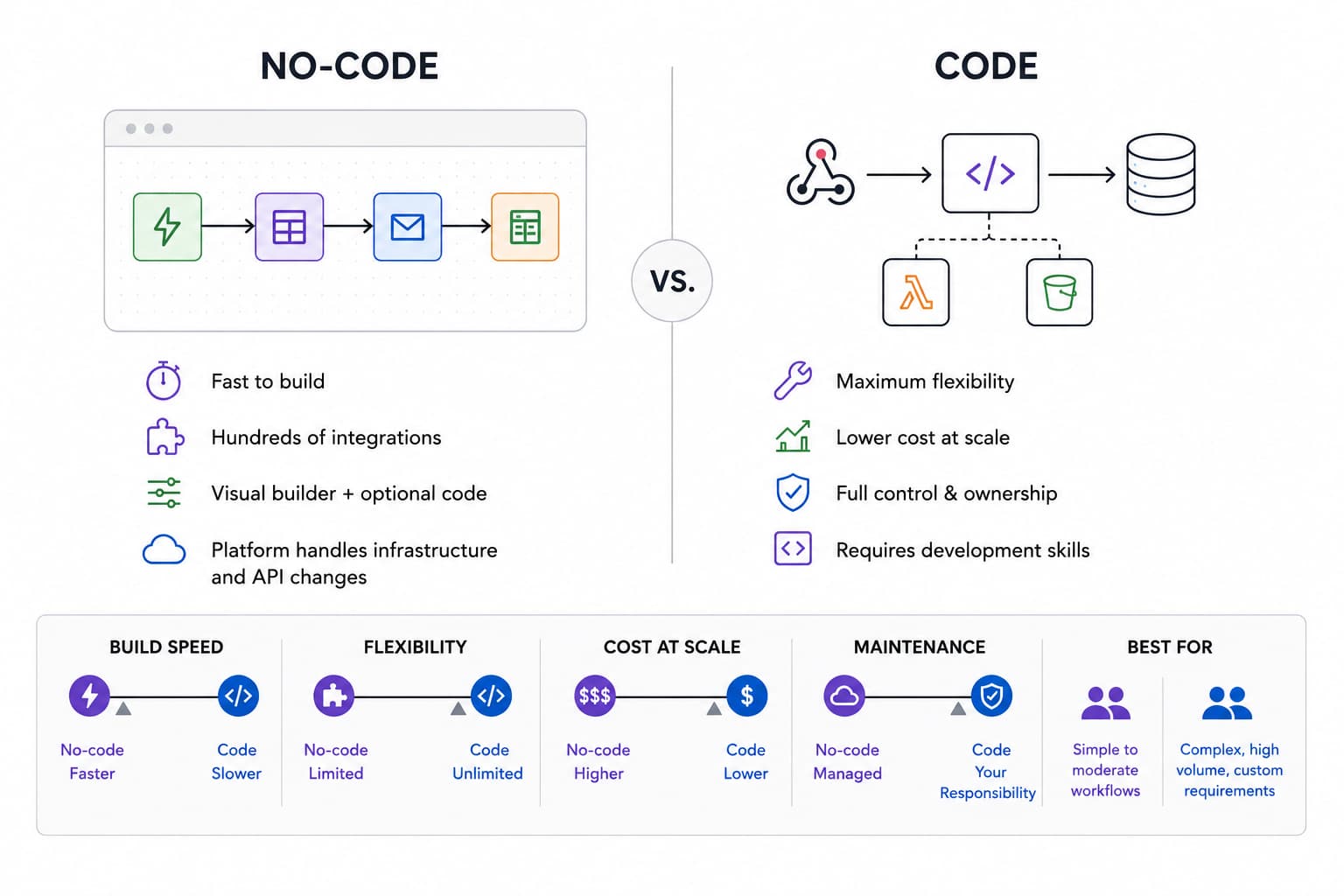
With a worthy, feasible, well-scored task in hand, choose your build approach.
No-code: start here for speed
First, a quick aside on webhooks. Worth understanding up front, because it underpins both the no-code and the code approaches below.
A webhook is just a way for one system to notify another the instant something happens. Instead of your automation constantly asking "is there a new document yet?" (called polling), the source system sends a small HTTP message to a URL you control the moment the event occurs, carrying the data with it.
That's what makes automations feel instant and event-driven rather than scheduled: when a new email arrives, a form is submitted, or a payment clears, a webhook fires and your workflow springs to life.
If you're not a developer, or you just want to ship fast, no-code platforms are the place to start. The two most popular are Zapier and n8n. Both let you build visually: pick a trigger ("a new document arrives"), then chain actions ("extract these fields," "add a row to a spreadsheet," "send an email"). No infrastructure, no deploys: you wire up boxes in a browser and turn it on.
n8n is a personal favorite, and it's far more capable than the "no-code" label suggests:
- Hundreds of integrations. Like Zapier, it connects to hundreds of apps out of the box, so most of the wiring is already done for you.
- Code blocks when you need them. You're not locked into the visual builder; drop in a code block to do something custom in the middle of a flow.
- Built-in AI agents. You can wire AI agents directly into a workflow, mixing AI steps in with the rest of your automation.
You can self-host n8n (cheaper, and your data stays under your control), or buy a plan directly through their website, the easier and faster way to get going, just costlier. If you go the hosted route, watch two limits:
- Workflow executions: how many end-to-end runs you get per month.
- Live workflows: how many active workflows you're allowed to have at once.
One real advantage of no-code platforms over rolling your own: they manage the vendor integrations for you. Remember Step 2's warning about APIs changing under you? On these platforms, when a vendor deprecates or reshapes an API, the platform updates the connector, so you never have to handle the deprecation yourself.
The catch: a no-code environment gets extremely limiting for complex logic: loops with multiple decision points, retries, branching error handling. Good software is mostly exception handling, and while you can express a lot of that in a visual builder, it gets awkward fast. It's possible here; it's just not our favorite place to do it.
Code on AWS: when you outgrow no-code
No-code tools are excellent until you hit their ceiling: high volume, custom logic, tight cost control, or integrations the platform doesn't support. At that point a code-based solution is the better answer, and the cloud is where most of them live. A provider like AWS gives you complete control: use a service like AWS Lambda to run small functions in response to events (often triggered by a webhook), store data wherever you like, and shape the logic to do exactly what your process needs.
The other big advantage is cost. AWS is meaningfully cheaper than n8n or Zapier at scale. Hosted no-code platforms charge per task or per execution, and those fees climb fast as volume grows. With AWS you largely pay for the compute you actually use, and for a high-volume, repetitive workflow that can be a fraction of the price.
The trade-off is that you need development capability to build and maintain it, so the sweet spot is a workflow important enough to justify the engineering.
Building it is faster than ever, with a caveat. A new class of AI coding tools (Codex, Claude Code, OpenCode) act like AI programmers: describe what you want and they'll scaffold a working pipeline remarkably fast. For getting a code-based automation off the ground, they're a genuine accelerant.
But go in clear-eyed:
- They make a lot of mistakes. The speed is real; the correctness isn't guaranteed. You still have to read, test, and verify everything they produce.
- They don't handle the edge cases by default. Out of the box they build the happy path; they won't anticipate the malformed input, the API timeout, the duplicate record, or the partial failure.
And that's the whole game, because software is mostly exception handling. A robust pipeline is one that survives weird inputs and the vendor errors from Step 2, and getting there still takes real engineering time, AI assistant or not. Use these tools to move fast, then invest the time to make the result actually robust.
Step 5: Understand what the AI will cost to run
The cost nobody budgets for is the AI itself. It's easy to wire up a model, watch it work in testing, and then get blindsided by the bill once real volume hits. This step is about understanding why AI costs what it does, and the few choices that swing it by 20–200x.
How AI pricing works, in plain language
Models charge by the token. A token is just a chunk of text, roughly ¾ of a word, so 1,000 tokens is about 750 words. You pay for two things on every single call:
- Input tokens: everything you send in (your instructions plus any document or context).
- Output tokens: everything the model writes back. Output is usually several times more expensive than input.
So your bill, boiled down, is: (tokens in × input rate) + (tokens out × output rate), added up across every run. The more text in and out, and the more often it runs, the more you pay.
A practical example, and why "thinking" inflates it
Say you reach for a flagship model like gpt-5.5-pro, priced at $30 per million input tokens and $180 per million output tokens (always check current pricing; it changes).
Take one document-extraction call: about 2,000 tokens in (your prompt + the document) and 500 tokens out (the structured result). That's roughly $0.15 a run: $0.06 of input plus $0.09 of output. At 10,000 runs a month, about $1,500.
Now let the model "think." Before answering, a reasoning model generates thousands of hidden reasoning tokens, and you pay for every one as output. The same call might now produce ~5,000 thinking tokens on top of the 500-token answer, landing around $1.05 a run, roughly $10,500 a month for one step in one workflow. That's the point: AI cost is variable, and "thinking" is the single biggest hidden multiplier.
Do you actually need the state-of-the-art model?
Before you reach for the newest, strongest model, ask whether the task truly needs it. A lot of automation work (classifying a document, pulling a few fields, routing a record) runs perfectly well on a small or older model, the kind of competence GPT-4o had a year ago. On the current lineup that's something like gpt-5.4-nano ($0.20/M input, $1.25/M output), pennies next to the flagship.
Run the same 10,000 document calls through it and you're looking at about $10 a month, versus ~$1,500 on gpt-5.5-pro for the identical task. Depending on the model you pick, the same job can cost anywhere from 20x to 200x more, and that's before you factor in "thinking," which stacks on top of all of it.
The newer models are genuinely better; they're just not always necessary. Match the model to the difficulty of the job, not to the headlines.
Be wary of reaching for a full AI agent
The most expensive shape of all is a full autonomous agent. It carries all its "thinking" and context on every run, and that context balloons fast. The result: a task as trivial as moving a file into a folder can cost $1–2 per run when it's really a deterministic step that needs no reasoning at all. That isn't the model being expensive; it's bad engineering, paying an LLM to think about something that was never a thinking problem.
The better pattern for most automations is code → a sprinkle of AI exactly where judgment is needed → more code. Let deterministic code handle the moving, routing, and validation, and call the model only for the genuinely fuzzy part: classifying a document, extracting a field, deciding a category. In practice this is often 100x cheaper than an autonomous agent doing the same job.
If you do build an agent, put guardrails on cost from day one:
- Monitor spend daily. Track input tokens, output tokens, and total cost every day, so you catch a runaway the day it starts, not as a surprise bill at the end of your first month.
- Cap multi-agent systems hard. If multiple agents talk to each other, set a max message size on each exchange and a max number of back-and-forths before the system must execute or stop for your approval. Set it up wrong and two agents can echo each other in a loop, in the worst case indefinitely, burning tokens every round. The caps are your circuit breaker.
Where you run it matters too
Finally, you have to decide the infrastructure your AI workflow runs on: a continuous, always-on server, or serverless (you pay only when it actually runs). Both have their place: serverless shines for spiky, event-driven work, while an always-on server can win for constant, high-throughput, low-latency loads.
For an automation that fires a handful of times an hour, this choice alone can be the difference between a ~$100/month always-on setup and a ~$1/month serverless one. I wish the answer were straightforward and I could just say "do this," but it's genuinely situation-dependent.
Should you build it in-house or buy off the shelf?
Even once you know a task is worth automating, there's a prior question: should you build it yourself, or buy something that already does it?
In-house is great, if you have the talent. With engineers who can build and maintain it, an in-house automation fits your process exactly. But be honest about the economics: on a fully-billed, per-hour basis, in-house will almost always cost more than a market solution. A product company built its tool to scale across many customers and spreads that build cost over all of them, so it can, and should, come in cheaper than paying your own people to build the same thing from scratch.
Buying can be a coin toss. The market is noisy. For any given problem there are dozens of tools making near-identical claims, and quality swings wildly: some are genuinely great, others are a nice landing page wrapped around very little. Budget time to vet before you commit.
Be wary of "custom AI automation." If a vendor sells you a bespoke, built-just-for-you AI automation, expect it to be expensive. A one-off build is the costliest model there is; it's really just in-house development with someone else's markup on top.
Look for generalized software. The sweet spot is a company building generalized software for your industry. Firms within an industry (fintech, say) tend to run remarkably similar tech stacks and hit the same problems, so a tool designed to generalize across them can fit you well at a fraction of the cost of a custom build. You get most of the tailoring of a bespoke solution at the price of a shared one.
See the framework in action
Take the workflow from Step 1 (a document arrives, someone copies its data into Excel, a report runs, and the report gets emailed to the team) and run it through all five steps:
- Step 1, Candidate? Yes. It happens every day, the fields are always the same, and there's no judgment involved. Textbook repetitive-and-systematic.
- Step 2, Can you get the data? Check it now. Does the document arrive somewhere you can read programmatically (an inbox, a folder, an upload)? Can you write to the spreadsheet or reporting tool via API, and is that API on your current plan? If the report lives in a tool with no API, that's your dead end, and far cheaper to find today than in week two.
- Step 3, Score it. High value (daily, multi-person) and, assuming the data access checks out, low-to-moderate effort. That lands it in Implement, unless one of those integrations turns out to be nasty, which slides it toward Challenge.
- Step 4, Build it. Prototype in n8n: trigger on the new document, sprinkle in AI only to extract the fields, then let plain logic build the report and send the email. No autonomous agent required, and a fraction of the cost.
- Step 5, Cost it. Extraction is a simple, well-defined task, so reach for a small, cheap model, not a frontier reasoner in thinking mode. Run it serverless so you only pay when a document actually arrives, and watch the token spend for the first week to confirm the numbers.
That's the whole framework in one pass: a clear yes, a confirmed data path, a quadrant, a build plan, and a cost you've sized on purpose.
Red flags: when the answer is "don't automate"
Sometimes the most valuable output of this framework is a confident no. Walk away, or at least pause, when you see:
- It happens rarely. A quarterly task you can do by hand in an hour rarely earns back the build.
- Every run needs real judgment. If a human has to weigh context and decide each time, you're automating a decision, not a process, which is much harder and much riskier.
- The rules change constantly. Logic that gets rewritten every month means an automation you're forever maintaining.
- You can't get the data. Step 2's dead end. No access, no automation, full stop.
- It's low value and high effort. The Kill quadrant. Be honest here; this is where motivated reasoning does the most damage.
Saying no to these frees you to pour effort into the handful of tasks that genuinely pay off.
Should I automate a task that only happens occasionally?
Usually not. Automation earns its keep through repetition: the per-run savings have to compound into something meaningful. A task you run a few times a year, even a tedious one, rarely justifies the build and the ongoing maintenance. Batch those by hand and spend your automation budget on the daily and weekly work instead.
How do I know if a task is too complex to automate?
Complexity shows up as effort on the PICK matrix, and the biggest hidden source of it is integrations. A task that looks like a quick script becomes a multi-week project the moment it depends on a flaky third-party API with strict validation and errors you must handle.
A good gut check: list every external system the automation touches and every branch in its logic. If either list is long, or Step 2 revealed a fragile, paywalled, or undocumented API, treat it as a Challenge, scope it carefully, and consider whether a smaller slice delivers most of the value.
Are AI agents ever the right choice?
Yes, when the task genuinely needs open-ended, multi-step reasoning you can't script in advance. But that's rarer than the hype suggests, and you should go in expecting it to be expensive. For most automations (moving, routing, extracting, validating), a code/AI hybrid that calls the model only where judgment is needed is dramatically cheaper and more predictable. If you do build one, see Step 5 for the cost guardrails (daily spend monitoring and hard caps on multi-agent loops) that keep it from running up a surprise bill.
What to take away
The discipline is in the order:
- Find a repetitive, systematic task.
- Confirm you can actually get the data before you write a line of code.
- Score it honestly on value vs. effort, letting integration complexity push the effort up.
- Match the build to where the task sits: no-code to start, AWS when volume and cost demand it.
- Size the cost on purpose: right-size the model, pick the right infrastructure, and watch the token spend.
Do those five steps in sequence and you'll spend your time building the automations that actually pay off, instead of discovering a dead end (or a runaway bill) a week in.
If you're interested in automating your invoice/receipt capture directly from your email, check us out here at DocStreamAI.